Scroll Velocity Feedback
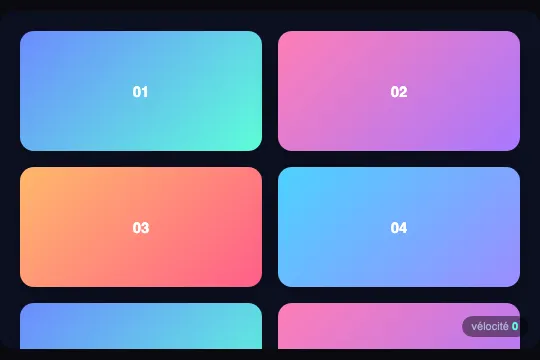
Ten cards in a scrolling box: every frame, the script measures how far scrollTop moved, smooths it by 20% and writes it into two CSS variables — skewY up to 4° and scaleY up to +12% at 30 px per frame. Measured: a capped flick shows only 1.5° at 120 Hz, the 420 px box keeps 284 px of travel at any width, and the loop never stops.
Updated
This effect is part of Effect.Labs — 840 vanilla effects, some free, some premium. Scroll has 74 effects, including 12 free. Explore the category →


3 usage examples

How it works
Anatomy: .svf-scene (height: 420px capped by max-height: 100vh, overflow: hidden, isolation: isolate, #0c1022 background, white sans-serif text, 14 px radius) holds .svf-scroll, an absolute container on inset: 0 with overflow-y: auto, 20 px of padding and a hidden scrollbar (scrollbar-width: none backed by ::-webkit-scrollbar { width: 0 }). Inside, .svf-grid lays out ten 120 px .svf-card on two columns (16 px gap), four gradients via nth-child(4n+1…4n), labels "01" to "10" in white 15 px bold. Each card carries transform: skewY(calc(var(--svf-v, 0) * 4deg)) scaleY(calc(1 + var(--svf-a, 0) * .12)), transition: transform .08s linear and will-change: transform. The content is 5 × 120 + 4 × 16 + 40 = 704 px for a 420 px box: 284 px of travel at any width (measured: scrollHeight − clientHeight = 284 at 1,280 px as at 390 px). The height is fixed, not a ratio of the width, for exactly that reason: a box that grew with the screen would end up holding all of its content and have nothing left to scroll. The .svf-meter readout (aria-hidden, 11 px, bottom-right corner) shows "vélocité" and .svf-val. The ten cards as sold carry an inline style="--svf-v: 0.000; --svf-a: 0.000;": a resting state frozen at extraction time, harmless since the script rewrites these variables every frame.
The loop: for each .svf-scene, a loop() function on requestAnimationFrame reads scrollTop, computes raw = cur − last (the displacement since the previous frame, in pixels) then v += (raw − v) × 0.2 — an exponential smoothing that closes 20% of the gap per frame. clamped = clamp(v, −30, 30) / 30 brings the speed back between −1 and 1; the loop runs scene.querySelectorAll('.svf-card') again and writes on each one --svf-v (signed, three decimals) and --svf-a (absolute value), then Math.round(|v|) into the readout, uncapped. Scrolling down, --svf-v is positive: skewY pushes the right edge of every card down; scrolling up, it lifts it. Everything is counted in frames, not milliseconds: after you stop, v keeps 33% of its value five frames later, 11% after ten, under 0.5% after twenty-four — 0.2 s at 120 Hz, 0.4 s at 60 Hz. Measured at 122 Hz: a 100 px wheel notch applied in one frame gives v = 20, --svf-a 0.667, readout "20", back to zero in 180 ms; a jump to the end of travel (284 px in one frame) gives v = 57 (readout), capped at 1.000 for three frames.
What shows on screen is quieter than the formula. The 80 ms transition chases a target that loses 20% per frame: on a brief gesture, the computed transform never reaches the nominal value. Measured on the first card, capped flick (--svf-a = 1): 1.47° and scaleY 1.044 at 122 Hz, 2.77° and 1.083 at an emulated 60 Hz — 37% then 69% of the advertised 4° / +12%; 100 px notch: 0.74° / 1.022 at 122 Hz, 1.11° / 1.033 at 60 Hz; visually back to sharp 350 ms after the gesture. Only a sustained scroll approaches the nominal value: 16 px per frame held steady gives --svf-a 0.53, i.e. 2.1° — 1.31° measured after thirteen frames. Two consequences: the amplitude depends on the display's refresh rate (stronger at 60 Hz than at 120), and the loop never stops — measured at rest, with no scrolling at all: 2,400 setProperty and 120 querySelectorAll per second to rewrite "0.000" on ten cards; under reduced motion, zero writes but still 120 requestAnimationFrame calls per second.
Accessibility
prefers-reduced-motionis present and the fallback is complete:matchMediais read once at load and, underreduce, the loop exits before writing anything — measured: 0setProperty, identitytransformafter 300 px of wheel, readout stuck on "0", native scrolling intact (WCAG 2.3.3, animation from interactions: met). Three limits: a preference changed mid-page is not followed (nochangelistener); thesvf-reducedclass the CSS provides for (transform: none !important) is never set by the script, it is a manual switch; the readout stays visible at 0 — hide it under@media (prefers-reduced-motion: reduce).- Hidden scrollbar and a box without
tabindex:scrollbar-width: noneand::-webkit-scrollbar { width: 0 }remove the only visible handle, and nothing says the area scrolls. Measured in Chromium: Tab reaches.svf-scroll(keyboard-focusable scrollers since Chrome 130), Arrow down moves 40 px per press (peakv8,--svf-a0.27); Firefox and Safari do not stop there. Addtabindex="0",role="region"and anaria-labelon.svf-scroll, with a:focus-visiblering atoutline-offset: -3px(the scene'soverflow: hiddenclips an outer outline). Nooverscroll-behavior: at the end of travel the wheel moves on to the page (measured: 284 px consumed by the box, the next notch scrolls the page by 300 px). - Text deforms with the card:
skewYshears andscaleYstretches everything the card contains, digits included, during the gesture. Keep the effect on containers (rows, thumbnails) and away from paragraphs people read while scrolling. Contrast of the labels as sold (white 15 px bold, 4.5:1 threshold): from 1.25:1 on the mint end of the first gradient to 3.1:1 at best — none passes; they are demo placeholders, replace them with your content or switch the text to#0c1022(6.8:1 to 9.7:1 at the midpoint of the four gradients). The readout holds: 9.5:1 for the label and 15.8:1 for the value on its 45% black background. - Screen readers and touch: the readout is
aria-hidden="true"— essential, it would change up to 120 times per second — and the script only writes inline custom properties, so the accessibility tree is never touched. The cards are role-lessdivs: in a real list, keep yourul/lior links and put the classes on them. The "vélocité" label is hard-coded, in French, in the HTML as sold. Under a finger, the effect follows the drag and its momentum since it readsscrollToprather than events: measured with touch emulation, a 160 px drag in 130 ms →--svf-a0.22, back to zero when the gesture ends.
Browser compatibility
ES5 code (var, function, IIFE), requestAnimationFrame, matchMedia, NodeList.forEach (Chrome 51, Firefox 50, Safari 10), CSS variables read inside two calc() of a transform (Chrome 49, Firefox 31, Safari 9.1), will-change, isolation, inset and place-items. The real floor is the inset shorthand (Chrome 87, Firefox 66, Safari 14.1), which stretches .svf-scroll over the whole box; the height of .svf-scene is a plain height capped by max-height: 100vh, understood everywhere. scrollbar-width (Firefox 64, Chrome 121, Safari 18.2) is backed by ::-webkit-scrollbar { width: 0 }. The speed is computed by the script from scrollTop, not by animation-timeline: the effect works in Firefox, which supports native CSS scroll-driven animations in no version — and no CSS property can expose a speed anyway, only a position. Zero dependencies: no library, no image, no file to host — the three blocks pasted into a blank page are enough.
Without JavaScript, the box scrolls normally, the cards stay straight (the variables keep their inline 0.000) and the readout shows "0" — measured: identity transform after 300 px of wheel. Without the inset shorthand (pre-2021 browsers), .svf-scroll is no longer stretched over the box: replace it with top: 0; right: 0; bottom: 0; left: 0. Without CSS variables, calc(var(--svf-v, 0) * 4deg) is invalid and the whole transform declaration is dropped: straight cards, no error.
The code
HTML structure to paste into your page (the CSS + JS come with your purchase):
<div class="svf-scene">
  <div class="svf-meter" aria-hidden="true">vélocité <b><span class="svf-val">0</span></b></div>
  <div class="svf-scroll">
    <div class="svf-grid">
      <div class="svf-card">01</div>
      <div class="svf-card">02</div>
      <div class="svf-card">03</div>
      <div class="svf-card">04</div>
      <div class="svf-card">05</div>
      <div class="svf-card">06</div>
      <div class="svf-card">07</div>
      <div class="svf-card">08</div>
      <div class="svf-card">09</div>
      <div class="svf-card">10</div>
    </div>
  </div>
</div>One-time payment, no subscription — the code is yours forever
Customize
Options passed to the API or data-* attributes:
| Option / property | Default | Effect |
|---|---|---|
Maximum angle (CSS — skewY(calc(var(--svf-v, 0) * 4deg))) |
4° | Tilt reached at 30 px per frame; the sign follows the scroll direction. On a brief gesture the visible peak stays well below (1.5° measured at 120 Hz, 2.8° at 60 Hz): 6 to 8° for narrow tiles, 2° for lines of text. |
Maximum stretch (CSS — scaleY(calc(1 + var(--svf-a, 0) * .12))) |
+12% | Vertical elongation, always positive (absolute value). Cards stretch from their centre and bite 7 px into their neighbours at full speed; 0 to keep only the tilt. |
Speed cap (JS — Math.max(-30, Math.min(30, v)) / 30) |
30 px per frame | Speed at which the effect saturates. A 100 px wheel notch applied at once gives 20; a measured touch drag, 7. 15 saturates earlier and exaggerates gentle gestures; 60 reserves the full amplitude for big flicks. |
Smoothing (JS — v += (raw - v) * 0.2) |
0.2 per frame | Fraction of the gap closed each frame: rises to 89% in ten frames, drops under 0.5% in twenty-four. 0.1 = heavier inertia (forty-eight frames), 0.5 = snappy response. Counted in frames: twice as long in milliseconds on a 60 Hz display. |
Transition (CSS — transition: transform .08s linear) |
80 ms | A second smoothing, in milliseconds this time, that shaves the visible peak of a brief gesture (1.47° instead of 4° measured at 120 Hz). none so the card follows the variable frame by frame — the choice made in the three examples; .15s for a softer look. |
Content and box height (HTML — 10 .svf-card of 120 px; CSS — height: 420px; max-height: 100vh) |
704 px of content, 420 px box | The travel is the difference between the two: 284 px, at any width. Put your real list in (aim for at least two box heights so the speed has time to build up) or change the height, keeping the box shorter than its content: once they are equal, nothing scrolls any more, so nothing moves. The 100vh cap only stops it from exceeding the screen. |
Readout (HTML — .svf-meter / .svf-val) |
"vélocité" + px per frame, aria-hidden |
Shows Math.round(|v|) uncapped (57 measured for a jump to the end of travel, 284 px in one frame). Remove the whole block: the script tests if (val). The label is in French in the HTML. |
Card selection (JS — scene.querySelectorAll('.svf-card') inside the loop) |
every frame | Looks the cards up 120 times per second and writes twenty variables. Move the query out of the loop, or write the two variables once on .svf-grid — the cards inherit them — to divide the writes by ten. |
FAQ
scrollHeight − clientHeight: 704 px of cards minus the height of the box. With a height proportional to the width (aspect-ratio: 16/10, say), the box grows with the screen and ends up holding all of its content — measured with that ratio: 214 px of travel at 784 px wide, 89 at 1,000, zero from 1,127 px, and the wheel goes straight to the page. Without scrolling, raw is always 0, v stays at 0, the cards do not move and neither does the readout. The fixed height guarantees 284 px of travel everywhere (measured at 1,280 px as at 390 px); max-height: 100vh only stops it from exceeding the screen. If you change the height or the content, check in the console that s.scrollHeight − s.clientHeight stays clearly positive — aim for at least two box heights so the speed has time to build up.scrollTop / (scrollHeight − clientHeight), from 0 to 1 — inside a passive scroll listener, and turn it into a fill level or element entrances: stop halfway, the scene stays halfway. This one computes a derivative: the difference in scrollTop between two frames, smoothed, with no listener at all; stop anywhere, everything returns to zero within twenty-four frames. It is the only information in the batch that describes the gesture rather than the place, and no CSS scroll-driven animation (animation-timeline) can produce it: a timeline exposes a position, never a speed. The price: a permanent requestAnimationFrame loop where the other two only work during the event. The three stack without conflict on the same box, by the way — different variables and classes — if you want both a progress indicator and speed feedback.loop() requests the next frame before testing anything. Measured at rest, box motionless: 120 requestAnimationFrame calls, 120 querySelectorAll and 2,400 setProperty per second to rewrite 0.000 on ten cards — and still 120 calls per second under reduced motion, where the loop does nothing. On a page that stays open, that is a style recalculation every frame for nothing. Six-line fix: keep a running flag; in loop(), if raw === 0 and |v| < 0.01, write 0 one last time, set running = false and do not request another frame; on scroller.addEventListener('scroll', …, { passive: true }), if !running, reset last = scroller.scrollTop, set running = true and call loop() again. Under reduced motion, simply never start the loop: if (reduceMotion) return; before the call. For a box off screen, an IntersectionObserver can cut it the same way.

