Text Line Reveal
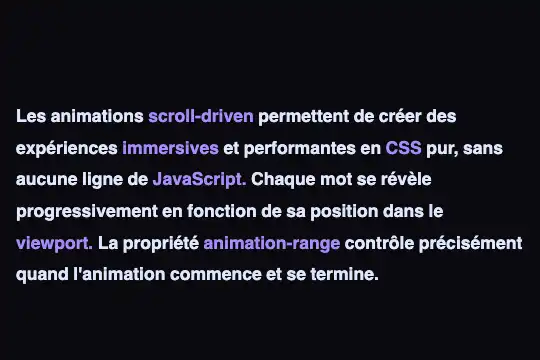
Each word is a span with animation-timeline: view(): from 15% white to #e0e7ff between entering at the bottom of the box (480 × 300 px) and 40% of its crossing — lit 167 px from the top, whatever the number of lines. Six accents marked in the HTML turn purple. 1.9 KB of CSS, zero JavaScript.
Updated
This effect is part of Effect.Labs — 811 vanilla effects, some free, some premium. Scroll has 70 effects, including 12 free. Explore the category →
3 usage examples
How it works
The sold HTML (2.4 KB): a .demo-preview frame (centered flex, min-height: 300px, #0a0a0f background) and a .textline-container box — 100% capped at max-width: 480px, height: 300px, overflow: hidden auto, padding: 40px 16px — holding a 60 px spacer, 43 span.textline-word (one word and its space per span, inline-block, 1.1 rem weight 700, line-height 1.8 = 31.7 px), 6 of them in .textline-accent, then two 60 px spacers. Beside it, the .slr-scroll-hint hint “Scrollez pour révéler” bounces 4 px every 2 s. No dependency on the site, no script, no console error. Measured: 7 lines and 182 px of travel at 1,264 px wide, 9 lines and 245 px at 374 px.
One rule does everything: animation-name: textLineFill, animation-timeline: view(), animation-range: entry cover 40%, linear, fill-mode: both, animation-duration: auto. view() creates an anonymous view timeline: subject = the span, scroller = the nearest scrolling ancestor, the box. entry 0% is the instant the top of the word touches the bottom edge of the box; cover 40%, 40% of the full crossing (300 + 31.7 = 331.7 px), i.e. 132.7 px higher. Over those 133 px, color goes from rgba(255,255,255,.15) to #e0e7ff: a word is lit as soon as its top is 167 px from the top of the box, and each line below loses 0.2 of opacity — measured at rest: 1 / 1 / 1 / 0.82 / 0.62 / 0.42 / 0.21 / 0.15. The .textline-accent spans repeat the same longhands with textLineFillAccent (rgba(139,92,246,.2) → #a78bfa): same geometry, another colour, words chosen in the HTML.
No global ratio: a word knows nothing about the rest of the text, it lights 167 px from the top whether the text is 3 lines or 300, and scrolling back dims it symmetrically. Without a scrolling container (remove height and overflow), view() takes the window: measured in an 800 px page, a word 700 px from the top is at 0.40, lit at 400 px. No id, no script: two pasted copies work side by side. Until 30/09/2026 the box was height: 100%, which is auto in a blank page: zero travel, 43 words lit from the start — measured identical in the site's preview. Fixed height and width cap make the travel real everywhere, catalog rendering unchanged.
Accessibility
- prefers-reduced-motion absent: measured under emulation, nothing changes — the lighting only moves under the reader's gesture (WCAG 2.3.3) and nothing is hidden, an unread word is at 15%, not 0; only the hint bounces on its own. Add
@media (prefers-reduced-motion: reduce) { .slr-scroll-hint { animation: none } }, and for a flat text,.textline-word, .textline-accent { animation: none; color: #e0e7ff }. - Keyboard: measured, Tab focuses the box without a
tabindexin Chromium 151 and Firefox 153, arrow down moves 40 px (51 in Firefox), PageDown and End go to the end. Puttabindex="0",role="region"and anaria-labelon.textline-containerto guarantee focus elsewhere (Safari not measured) and to name the area. - Contrast: lit,
#e0e7ffon#0a0a0fis 16:1, the#a78bfaaccent 7.3:1; unlit, white at 15% renders as#2f2f33(1.5:1) and purple at 20% 1.2:1 — unreadable by design, but only below the reading line. The hint at 40% is 3.8:1. Without the frame and its dark background, rewrite both keyframes (15% white on white: 1:1). - Screen readers:
spans in adiv, read straight through and in order, the space included in each span keeping words separate; accents are not announced (<strong>or<em>if they carry meaning). The hint is read in French whatever the page language:aria-hidden="true". Without CSS, an ordinary paragraph.
Browser compatibility
CSS only; animation-timeline: view(), animation-range and animation-duration: auto do everything. Chrome and Edge 115+, Safari and iOS 26+. Firefox: no version — animation-timeline is ignored there and animation-duration: auto rejected (computed 0s, measured in Firefox 153): the animation finishes instantly, fill-mode: both holds the last keyframe and the visitor sees the whole text lit (#e0e7ff, accents #a78bfa) in a box that scrolls normally — readable, no reveal. Nothing is hidden, so no @supports fallback is shipped; to make it explicit: @supports not (animation-timeline: view()) { .textline-word, .textline-accent { color: #e0e7ff } }. Zero dependencies.
Without animation-timeline (Firefox, Chrome < 115, Safari < 26): whole text lit, scrolling box, static. Without the two-value overflow: hidden auto (before 2018), the box does not scroll and view() attaches to the window. Without CSS, an ordinary paragraph.
The code
HTML structure to paste into your page (the CSS + JS come with Premium):
<div class="demo-preview">
  <div class="textline-container">
    <div class="textline-spacer"></div>
    <span class="textline-word">… </span>
    <span class="textline-word textline-accent">… </span>
    <span class="textline-word">… </span>
    …
    <div class="textline-spacer"></div>
    <div class="textline-spacer"></div>
  </div>
  <span class="slr-scroll-hint">…</span>
</div>The full HTML + CSS + JS of Text Line Reveal, ready to paste — plus all 811 effects. Or €299 once, lifetime access.
Customize
Options passed to the API or data-* attributes:
| Option / property | Default | Effect |
|---|---|---|
Box (CSS — .textline-container { height: 300px; max-width: 480px }) |
480 × 300 px, padding 40 / 16 px, 182 px of travel with the 43 sold words | The height places the reading line (H − 0.4 × (H + 31.7) = 167 px for 300); the width sets the number of lines, hence the travel: without the cap, 43 words fit on 3 lines at 1,264 px and 55 px are left to scroll. Give it a real text. |
Lighting zone (CSS — animation-range: entry cover 40%) |
entry 0% → cover 40% (133 px of transition, line lit 167 px from the top) | entry cover 25% lights lower (216 px), entry cover 60% higher (101 px); entry 0% entry 100% lights a word as soon as it has entered (32 px, crisp); cover 20% cover 60% lights in a central band. |
Colours (CSS — @keyframes textLineFill, textLineFillAccent) |

rgba(255,255,255,.15) → #e0e7ff · rgba(139,92,246,.2) → #a78bfa | The two keyframes carry the whole palette: on a light background, rgba(42,36,32,.16) → #2a2420 (scene 3); opacity, filter: blur() or transform animate in the same place. To switch without touching the sold rule, redeclare only animation-name after it. |
Accent words (HTML — textline-accent class) |
6 words out of 43 (scroll-driven, immersives, CSS, JavaScript., viewport., animation-range) | An editorial decision made in the HTML: add or remove the class, nothing to recompute. The .textline-accent rule redeclares every longhand: a property added to .textline-word must be copied there. |
Typography and granularity (CSS — font-size: 1.1rem; line-height: 1.8 · HTML — one span per word) |


17.6 px weight 700, 31.7 px line, one span per word (space included) | The line height is part of the crossing (H + h): a 24 px line = 130 px transition, lit at 170 px. Spans on the same line share the same progress: one span per line (song, poem) or per group (guided reading) gives the same lighting with ten times fewer elements. |
Scroller (CSS — overflow: hidden auto and height on the box) |
The 300 px box | view() takes the nearest scrolling ancestor; without height or overflow, the page becomes the scroller (reading line at 467 px for an 800 px window, measured). Pitfall: animation: textLineFill linear both written after animation-timeline resets the timeline to auto and lights everything — shorthand first, timeline after. |
Hint and spacers (HTML/CSS — .slr-scroll-hint, .textline-spacer) |
“Scrollez pour révéler” bouncing 4 px every 2 s · 60 px before the text, 120 px after | The hint is a catalog leftover: hard-coded French, absolute relative to .demo-preview (without that frame it drops to the bottom of the page) — remove or translate it. The spacers keep the first word below the reading line and let the last one rise above it; 120 px at the bottom is just enough. |
FAQ
animation-timeline is ignored and the animation jumps to its last keyframe — that is the measured fallback. The travel: the code sold before 30/09/2026 set height: 100%, which is auto outside a parent with a definite height, so nothing to scroll; the current version fixes 300 × 480 px, but a short text in a tall box gives the same symptom (3 lines = 55 px of travel, all above 167 px). The shorthand: an animation: … declaration written after the sold rule resets animation-timeline to auto and the auto duration equals 0 s — same rendering as Firefox. Finally, an intermediate overflow: hidden captures the timeline: the box must be the nearest scrolling ancestor.entry 0% (the top of the word touches the bottom edge of the box) to cover 40%, 40% of the full crossing, box height + word height. For 300 px and a 31.7 px line: 0.4 × 331.7 = 133 px, so a word is lit when its top is 300 − 133 = 167 px from the top, and at 15% as long as it sits below the bottom edge; in between, linear, 0.2 of opacity per line (measured: 1 / 1 / 1 / 0.82 / 0.62 / 0.42 / 0.21). To raise the reading line, increase the cover percentage or shrink the box; for a sharper switch, tighten the range (entry 0% entry 100%: 32 px). The computation is per word, never over the length of the text.#e0e7ff, accent #a78bfa — and two opposite mechanisms. fx-0591 is a script: on each scroll event, ratio = scrollTop ÷ travel, the first floor(ratio × n) words get .lit, the next one .accent, a bar follows, and the text is pinned with sticky because the lighting depends on the global scroll: on a text longer than the box, it lights off-screen. fx-0569 has no script: each word carries animation-timeline: view() and lights 167 px from the top whatever the length of the text; the accent is a word chosen in the HTML. fx-0591 runs on Firefox 32+ and exposes a reusable number; fx-0569 requires Chrome/Edge 115+ or Safari 26+, works offline in a bare file and can be pasted as many times as you like, without ids.

