Jack-o'-Lantern Cursor
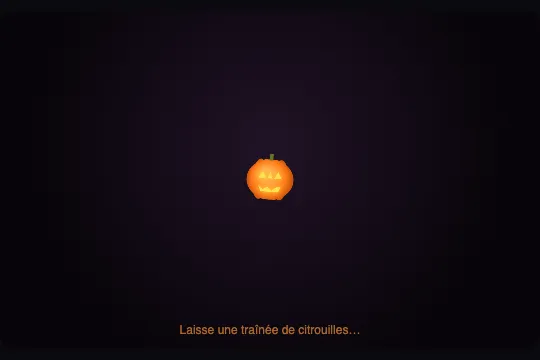
The cursor turns into a pumpkin head that leaves a trail of fading mini-pumpkins in its wake. Pure canvas, zero external assets.
Updated
This effect is part of Effect.Labs — 840 vanilla effects, some free, some premium. Cursors has 26 effects, including 1 free. Explore the category →
3 usage examples

How it works
A pumpkin sprite is drawn once onto an off-screen <canvas> (160×160 px) at load time: orange ellipse-shaped body with a radial gradient (createRadialGradient), green stem, triangular face with a yellow drop-shadow (shadowBlur) — no external assets. This sprite is reused every frame via drawImage() for the main cursor and each trail particle.
On each pointermove, the cursor position is read in canvas coordinates (multiplied by devicePixelRatio capped at 2) and a particle is pushed into the trail[] array if more than 28 ms have elapsed since the last one. Each particle carries a random size (s), opacity (a), rotation angle (r) and angular velocity (vr).
The requestAnimationFrame loop clears the canvas on each frame, iterates trail[] from oldest to newest (alpha decays ×0.9, size ×0.965 per frame), removes particles below 0.05 opacity, then draws the main cursor with a slight sinusoidal bounce (sin(bob)) and a rotation wobble.
Accessibility
- Reduced motion: under
prefers-reduced-motion: reduce, the script never pushes particles intotrail[]and disables the sinusoidal bob animation — the pumpkin cursor appears statically, without trail or sway. Note: the CSS rulecursor: noneremains active; to restore the system cursor, add@media (prefers-reduced-motion: reduce) { .jol-scene { cursor: auto } }. - Keyboard: the effect is purely decorative and does not respond to keyboard events.
- Touch:
pointermovealso captures touch moves. On mobile devices, the trail of pumpkins appears under the finger. - Semantics:
.jol-hintcarriesaria-hidden="true"to avoid interfering with screen readers. The effect zone itself has no ARIA role — it is purely visual. - Contrast: the effect does not modify any existing text or interactive elements.
cursor: noneon.jol-scenehides the system cursor only within the effect zone.
Browser compatibility
2D Canvas and vanilla JS, no dependency. requestAnimationFrame available since Chrome 24, Firefox 23, Safari 6.1. devicePixelRatio since Chrome 29, Firefox 18, Safari 8. performance.now() since Chrome 24, Firefox 15, Safari 8. Not verified on real Safari; expected full support.
Without JavaScript, .jol-scene displays its radial-gradient background without cursor or trail — the zone remains accessible and readable. The cursor: none rule still hides the system cursor; without JS, add .jol-scene { cursor: default } or remove the attribute when the effect is not loaded.
The code
HTML structure to paste into your page (the CSS + JS come with your purchase):
<div class="fx-0805-root">
  <div class="jol-scene" data-jol="">
    <canvas class="jol-canvas"></canvas>
    <div class="jol-hint" aria-hidden="true">Leave a trail of pumpkins…</div>
  </div>
</div>One-time payment, no subscription — the code is yours forever
Customize
Options passed to the API or data-* attributes:
| Option / property | Default | Effect |
|---|---|---|
Activation zone — attribute data-jol |
present on .jol-scene |
Each element carrying this attribute becomes an independent zone: cursor and trail confined within its getBoundingClientRect(). Multiple zones can coexist in the same page without interfering. |
Scene background — CSS on .jol-scene |
radial-gradient(circle at 50% 40%, #211326, #070409 72%) |
Replace with any background (solid colour, image, other gradient) to adapt the palette to your page. The canvas effect is transparent — only this background and the pumpkins are visible. |
Cursor size — JS constant 56 |
56 × DPR = 56–112 px | Change the integer 56 in var i = 56 * l * a to enlarge (80) or shrink (36) the main cursor. Trail particles have their own factor s: .32 + .12 * Math.random(). |
| Trail density — delay between particles | 28 ms |
Reduce to 15 ms for a very dense trail on fast movements; increase to 60 ms for a sparse trail. Modify the comparison performance.now() - s > 28 in the JS. |
Particle fade speed — factor .9 |
a *= .9 (alpha) and s *= .965 (size) |
Lower the alpha factor (.85) for a trail that fades faster; raise it (.93) for pumpkins that linger longer. Adjust the size factor similarly to control shrinkage. |
Invitation text — .jol-hint |
"Laisse une traînée de citrouilles…" | Replace the HTML content or hide with .jol-hint { display: none } if the prompt is not needed. The hint is aria-hidden and has no functional impact. |
FAQ
data-jol to any element — a banner, a card, a modal — with position: relative; overflow: hidden; cursor: none. The pumpkin cursor stays confined within that container thanks to the position calculation relative to getBoundingClientRect(). Multiple independent zones can coexist on the same page.performance.now() - s > 28 with false (or Infinity): no particle will ever be pushed into trail[]. The main cursor is drawn statically (no sinusoidal bob); no trail is recorded.pointermove is fired by touch moves (pointerType === 'touch'). On mobile devices, the pumpkin trail appears under the finger. To disable the effect on touch only, add inside the listener: if (a.pointerType !== 'mouse') return; before updating the coordinates.