Séance Cursor
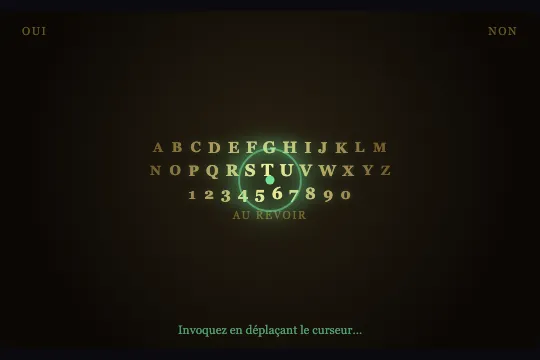
The Ouija planchette follows the cursor across the board, nearby glyphs glow in spectral green, and a ghost thread traces the path. Canvas + DOM.
Updated
This effect is part of Effect.Labs — 840 vanilla effects, some free, some premium. Cursors has 26 effects, including 1 free. Explore the category →
3 usage examples
How it works
The board is a .sea-scene container with cursor: none. Letters and digits (.sea-glyph) are <span> elements created dynamically from each [data-sea-row] line: text is split by spaces and each token becomes an independent .sea-glyph. The planchette is a div.sea-planchette positioned absolute, repositioned on each pointermove via style.left and style.top.
On each requestAnimationFrame loop frame, updateGlyphs() reads each .sea-glyph position via getBoundingClientRect(), computes the distance to the cursor (Math.hypot) and derives a factor k = max(0, 1 − d/RADIUS) (RADIUS = 120 px). This factor drives opacity (0.5 + 0.5 k), color interpolated from gold towards pale green-white, spectral green textShadow and scale (1 + 0.35 k) — all applied inline without CSS classes or transitions.
The spectral thread is drawn on a <canvas> (z-index: 1) in globalCompositeOperation: 'lighter' mode: trajectory points stored in trail[] are connected by segments whose thickness (2 + a × 5) and alpha both decay (a -= 0.012 per frame). The array is capped at 60 points; points with alpha ≤ 0 are removed. Under prefers-reduced-motion, the loop never starts and the planchette is hidden.
Accessibility
- Reduced motion: under
prefers-reduced-motion: reduce, the animation loop is not started and the ghost thread is not drawn. The planchette keeps following the cursor andupdateGlyphs()is called on eachpointermove— glyphs light up under the cursor without smooth animation. Note:cursor: noneremains active; the planchette visually replaces the system cursor. - Semantics:
.sea-corners,.sea-boardand.sea-hintcarryaria-hidden="true"— the board is purely decorative. No interactive element appears on the board. - Keyboard: the effect does not respond to keyboard input. If the board serves as a game interface, provide a separate keyboard navigation mechanism.
- Touch:
pointermovecaptures touch moves. On mobile, the planchette follows the finger and glyphs light up. - Contrast: glyphs at rest have an opacity of 0.55 on a dark background. On a light background, ensure the gold colour (
#c9a24a) maintains a sufficient contrast ratio (3:1 minimum for a decorative component).
Browser compatibility
2D Canvas and DOM, no dependency. Math.hypot available since Chrome 38, Firefox 27, Safari 8. getBoundingClientRect universal. globalCompositeOperation: 'lighter' available in all modern browsers. Not verified on real Safari; expected full support.
Without JavaScript, the board displays with static letters (opacity 0.55) and the planchette at its off-screen initial position (−100 px). The 'OUI/NON' and 'AU REVOIR' text remains readable. Without requestAnimationFrame (theoretical case), the effect does not start.
The code
HTML structure to paste into your page (the CSS + JS come with your purchase):
<div class="fx-0806-root">
  <div class="sea-scene" data-sea="">
    <canvas class="sea-canvas"></canvas>
    <div class="sea-corners" aria-hidden="true">
      <span class="sea-word">OUI</span>
      <span class="sea-word">NON</span>
    </div>
    <div class="sea-board" aria-hidden="true">
      <div class="sea-row" data-sea-row="">A B C D E F G H I J K L M</div>
      <div class="sea-row" data-sea-row="">N O P Q R S T U V W X Y Z</div>
      <div class="sea-row" data-sea-row="">1 2 3 4 5 6 7 8 9 0</div>
      <div class="sea-row"><span class="sea-word">AU REVOIR</span></div>
    </div>
    <div class="sea-planchette" data-sea-planchette=""></div>
    <div class="sea-hint" aria-hidden="true">Move the cursor to invoke the spirits…</div>
  </div>
</div>One-time payment, no subscription — the code is yours forever
Customize
Options passed to the API or data-* attributes:
| Option / property | Default | Effect |
|---|---|---|
Glow radius — JS variable RADIUS |
120 px | Reduce to 70 for a halo tightly focused around the cursor; increase to 200 for glows noticeable at a greater distance. The value is read on every frame and can be changed dynamically. |
Scene background — CSS on .sea-scene |
radial-gradient(circle at 50% 45%, #2a2113, #0b0805 75%) |
Replace with another dark gradient to shift the board's tint (deep violet, midnight blue, dark red). |
Glyph colour — CSS on .sea-glyph |
color: #c9a24a (gold) |
The base colour can be changed freely; the JS will always interpolate towards rgb(255, 255, 174) (pale green-white) on cursor hover. To change the illumination colour, modify the RGB calculations inside updateGlyphs(). |
Planchette size and colour — CSS on .sea-planchette |
64×64 px, spectral green | Reduce to 48×48 for a subtle cursor; increase to 80×80 for a very prominent one. Change border-color and box-shadow for a red, violet or gold planchette. |
Spectral thread colour — JS constant rgba(124,255,170,…) |
spectral green | Change the colour constant in the thread drawing loop (ctx.strokeStyle = 'rgba(…)') for a blood-red thread (220,30,30), ethereal blue (80,180,255) or pale gold. |
Displayed characters — HTML content of [data-sea-row] |
A–Z, 0–9, OUI/NON, AU REVOIR | Replace or supplement rows with any space-separated characters: runic symbols, emojis, Roman numerals, Cyrillic letters. Each token becomes an independent .sea-glyph. |
Invitation text — .sea-hint |
"Invoquez en déplaçant le curseur…" | Replace or hide with .sea-hint { display: none }. The hint is aria-hidden and has no functional role. |
FAQ
data-sea-row lines: the JS splits by spaces and creates one .sea-glyph per token. You can add symbols, emojis or replace the Latin alphabet with another script (Cyrillic, Runic, etc.). Characters the browser can't render will fall back to the system font; their cell size follows the same clamp as the letters.PointerEvent on the .sea-scene: scene.dispatchEvent(new PointerEvent('pointermove', { clientX: x, clientY: y, bubbles: true })). This repositions the planchette and triggers the glyph update exactly like a real mouse move. Useful for automatic sequences — a countdown that 'spells out' a word by sliding the planchette from letter to letter.[data-sea] element is initialised independently: its planchette, canvas and glyphs are private to the instance. Two boards can be active simultaneously with different colours or alphabets. The mx/my/trail variables are local to each closure — no interaction between instances.