Pricing Toggle Odometer
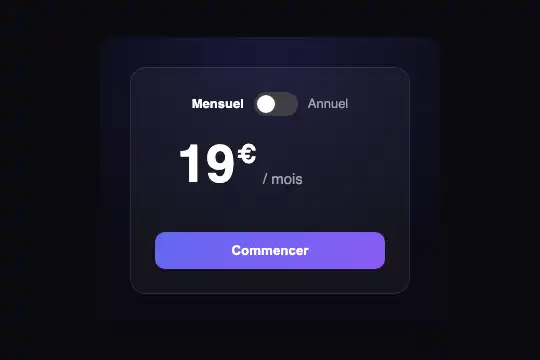
Monthly / yearly switch for a pricing card: each digit rolls in its own column like a counter, and the savings badge and yearly amount appear.
Updated
This effect is part of Effect.Labs — 840 vanilla effects, some free, some premium. Forms has 20 effects, including 2 free. Explore the category →
3 usage examples
How it works
Each [data-pto] card inside .fx-0808-root carries its two whole-number prices: data-monthly="19" and data-yearly="15". On load, the script clears the plain price written in [data-pto-digits] (the one people read without JavaScript) and replaces it with one column per digit, each holding the digits 0 to 9 stacked. Showing "15" means shifting the first column up by 1 em and the second by 5 em: the transform .65s cubic-bezier(.2,.85,.25,1) transition makes the digits roll.
The switch is a real, invisible checkbox placed in a <label> with the .pto-track rail. On the change event, the script picks the yearly or monthly price, puts "Monthly" or "Annual" in bold to match, and reveals the .pto-save badge and the .pto-sub line ("Billed $180 / year", the yearly price × 12, computed on load). The badge shows data-save when provided, otherwise the real rounded saving: 19 → 15 gives −21%.
Every card owns its switch and its columns: three cards side by side or two copies of the block work without interfering, and pasting the script twice does not rebuild the columns. When one price has fewer digits than the other (9 vs 12), the leading zero is hidden. Inside a <form>, a reset unticks the checkbox and brings the monthly price straight back. Whole numbers only: parseInt drops cents.
Accessibility
- Price read as words: the 0-9 columns are hidden from screen readers (
aria-hidden); an invisible sentence, "$19 per month", updated on every switch, is announced througharia-live="polite". - Keyboard: the checkbox stays reachable with Tab and toggles with Space; a light ring is drawn around the rail on keyboard focus (
:focus-visible). Its accessible name is "Annual billing". - Reduced motion: under
prefers-reduced-motion: reduce, the digits are set straight to their value with no rolling, and the rail and badge change without transitions. The price still changes. - Without JavaScript: the monthly price written in the HTML stays on screen; the switch can be ticked but changes nothing.
Browser compatibility
Dependency-free JavaScript (padStart, matchMedia, classList) and everyday CSS. Measured in Chromium 151, Firefox 153 and WebKit 26.5 (Playwright): two copies on one page, a click on the second leaving the first untouched, Tab then Space, touch at 390 px, reduced motion, 0 errors. The focus ring relies on :focus-visible (Chrome 86, Firefox 85, Safari 15.4); earlier, the switch works from the keyboard with no visible ring.
Without JavaScript, the monthly price from the HTML stays readable. Without :focus-visible (Safari before 15.4), there is no ring on keyboard focus but the switch still works.
The code
HTML structure to paste into your page (the CSS + JS come with your purchase):
<div class="fx-0808-root">
  <div class="pto-scene">
    <div class="pto-card" data-pto data-monthly="19" data-yearly="15">
      <label class="pto-switch">
        <span class="pto-m pto-on">Monthly</span>
        <input type="checkbox" data-pto-toggle aria-label="Annual billing">
        <span class="pto-track" aria-hidden="true"></span>
        <span class="pto-y">Annual</span>
      </label>
      <div class="pto-price">
        <span class="pto-amount" aria-hidden="true"><span class="pto-cur">$</span><span data-pto-digits>19</span></span>
        <span class="pto-suffix" aria-hidden="true">/ month</span>
        <span class="pto-save" data-pto-save>−<span data-pto-pct>21</span>%</span>
        <span class="pto-vh" aria-live="polite" aria-atomic="true">$<span data-pto-sr>19</span> per month</span>
      </div>
      <div class="pto-sub" data-pto-sub>Billed $<span data-pto-total>180</span> / year</div>
      <button type="button" class="pto-cta">Get started</button>
    </div>
  </div>
</div>One-time payment, no subscription — the code is yours forever
Customize
Options passed to the API or data-* attributes:
| Option / property | Default | Effect |
|---|---|---|
Prices (HTML — data-monthly and data-yearly on the card) |
19 and 15 | Whole numbers. Also write the monthly price in [data-pto-digits]: it is what shows without JavaScript. |
Badge saving (HTML — data-save on the card) |
absent: computed (−21% for 19 → 15) | Give a number to force the percentage shown, for example data-save="20". |
Card width (CSS — --pto-w) |
280px | auto lets the card take its column's width (plan grid). |
Price size (CSS — font-size on .pto-amount) |
52px | The digit columns are in em: they follow the size, from 30 px in a banner to 120 px in a hero. |
Roll speed (CSS — transition on .pto-strip) |
.65s cubic-bezier(.2,.85,.25,1) | Shorten to .4s for a snappier counter. |
Switch colour (CSS — .pto-switch input:checked+.pto-track) |
#6366f1 | The ticked rail takes this colour; the focus ring uses #a5b4fc. |
| Texts and currency (HTML) | Monthly, Annual, $, / month, Billed $… / year | All text lives in the HTML: put .pto-cur before or after [data-pto-digits], translate the sentence read by screen readers (.pto-vh) and the checkbox name (aria-label). |
FAQ
.pto-amount; only the whole part will roll.[data-pto] card listens to its own checkbox. For a shared switch, hide the cards' switches and, when yours changes, tick each checkbox and send it dispatchEvent(new Event('change')).prefers-reduced-motion): the script then sets the digits directly. The price, the badge and the yearly line change exactly the same way.