Liquid Glass Toggle
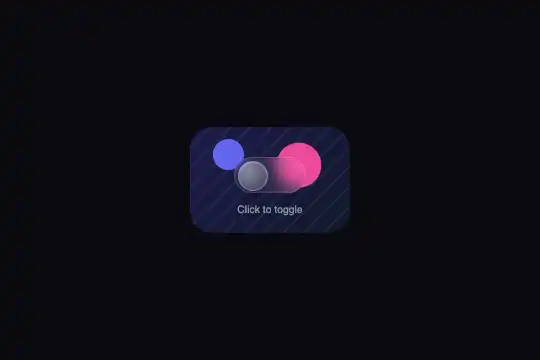
A 72 × 36 px glass switch whose 30 px ball slides with a slight overshoot and squashes along the way — flattened to 125 × 75%, then stretched, then round in 0.5 s — by click or keyboard (Space, Enter), with its state announced to screen readers.
Updated
This effect is part of Effect.Labs — 840 vanilla effects, some free, some premium. Glassmorphism has 47 effects, including 6 free. Explore the category →
3 usage examples
How it works
The .lg-toggle track is a 72 × 36 px pane of glass with round ends: 8% white fill, backdrop-filter: blur(8px) (with -webkit-), 15% white border. Switched on (.active), it takes a 20% indigo tint with a 40% indigo border, over 0.4 s. The .lg-toggle-knob ball (30 px, 3 px from the edge) is a glass drop: an off-center white radial gradient top left, its own 8 px blur with ×1.5 saturation, a 30% white border, a drop shadow and an inner highlight. Its left position goes from 3 to 39 px with a cubic-bezier(.34, 1.56, .64, 1) curve: it overshoots slightly before settling.
On every switch, the script flips .active, updates aria-checked and restarts the lgKnobSquish animation (0.5 s): it removes the .squishing class, forces a reflow (offsetWidth) and adds it back, so the squash replays on every click. At 30% of the animation the ball is at scale(1.25, .75) with flatter rounding on top, at 60% scale(.85, 1.15), at 80% scale(1.05, .95), then round. Measured 150 ms after a click: matrix(1.23, 0, 0, 0.77, 0, 0) in Chromium 151, matrix(1.25, 0, 0, 0.75, 0, 0) in Firefox 153; 600 ms later, the ball sits 40 px from the track's left edge (4 px at the start, border included).
The switch is built to live alongside your page. The script exposes nothing globally — no toggle() function that could replace a menu's or a theme's — and applies to every [data-lg-toggle] element (measured: typeof window.toggle is undefined). The element carries role="switch", tabindex="0" and aria-checked, Space and Enter flip it, and a 2 px :focus-visible outline marks it — measured in Chromium, Firefox and WebKit: Tab focuses it, Space switches it on (aria-checked="true", page not scrolled), Enter switches it off. Finally .lg-toggle-wrap carries a setting (two sharp discs, hatching) under the track: over a flat color, the ball's blur would not show.
Accessibility
- Accessible name: the switch announces its role and state, but not what it controls — the “Click to toggle” text next to it is not attached. Give it a name:
aria-label="Pool heating", or anidon the visible label andaria-labelledbyon the switch. Without it, a screen reader only says “switch, off”. - Keyboard: Tab, then Space or Enter (measured in all three engines). Space is intercepted (
preventDefault) so the page does not scroll. The#a5b4fcfocus outline measures 8.0:1 on the#1e1b4bsetting and 9.9:1 on#0a0a0f; it only appears with the keyboard, not on click. - State readable without color: the ball's position tells on or off; the 20% indigo tint of the on track is faint (the resting border measures 1.6:1 on the setting). If the state matters (heating, alarm), back it up with a word next to it — “On” / “Off” — as in the scenes on this page.
- Motion: slide and squash last 0.5 s and only happen on user action. Nothing is provided for
prefers-reduced-motion: add@media (prefers-reduced-motion: reduce) { .lg-toggle-knob { transition: left .15s; } .lg-toggle-knob.squishing { animation: none } }— the ball slides quickly with no bounce.
Browser compatibility
CSS: backdrop-filter (and -webkit-), transitions with an overshooting curve, @keyframes on transform and elliptical border-radius, :focus-visible. JS: classList, setAttribute, keydown. HTML: role="switch" and aria-checked. Zero dependencies. Measured in Chromium 151, Firefox 153 and WebKit 26.5: switches on click, Space and Enter, squash replayed on every switch, no console error.
The minimum versions are those of :focus-visible. Before them, the outline rule is ignored: the switch works, keyboard included, but focus no longer shows. Without backdrop-filter (Firefox before 103), track and ball stay translucent with no blur; squash and slide are unchanged.
The code
HTML structure to paste into your page (the CSS + JS come with Premium):
<div class="demo-preview">
  <div class="lg-toggle-wrap">
    <div class="lg-toggle" data-lg-toggle="" role="switch" tabindex="0" aria-checked="false">
      <div class="lg-toggle-knob"></div>
    </div>
    <span class="lg-toggle-label">…</span>
  </div>
</div>The full HTML + CSS + JS of Liquid Glass Toggle, ready to paste — plus all 840 effects. Or $299 once, lifetime access.
Customize
Options passed to the API or data-* attributes:
| Option / property | Default | Effect |
|---|---|---|
Size (CSS — .lg-toggle { width: 72px; height: 36px }, .lg-toggle-knob { width: 30px; height: 30px }, .active .lg-toggle-knob { left: 39px }) |
72 × 36 px track, 30 px ball, 36 px travel | The sold code sets left: 39px in the on position (the ball nearly touches the end). For a symmetrical margin, compute: width − borders (2 px) − margin (3 px) − ball, i.e. 37 px here. For 88 × 44 and a 36 px ball: left: 47px. Keep a 44 px height on mobile for a comfortable touch target. |
Squash (CSS — @keyframes lgKnobSquish) |
0.5 s: 1.25 × 0.75 → 0.85 × 1.15 → 1.05 × 0.95 → 1 | 1.15 × 0.85 for a firmer ball, 1.35 × 0.65 for a very soft drop. Keep the same duration as the left transition (0.5 s) so the squash goes with the travel. |
Slide bounce (CSS — cubic-bezier(.34, 1.56, .64, 1)) |
overshoot of about 10% of the travel | The 1.56 sets the overshoot: 1.2 for a discreet bounce, 1.8 for a ball that “hits” the end of the track. ease removes the bounce. |
On color (CSS — .lg-toggle.active) |
20% indigo, 40% indigo border | For a state read at a glance: background: rgba(34,197,94,.55) (green) or your brand color at 50-60%. The glass ball stays readable on it. |
Setting behind the glass (CSS — .lg-toggle-wrap, padding and background) |
two sharp discs (pink, indigo), hatching, night background | It makes the blur visible in the demo. On your page, remove the rule's padding and background: the switch will blur your picture or interface. |
FAQ



aria-checked attribute ("true" or "false") or the .active class, updated on every switch, by click or keyboard. To react: new MutationObserver(function () { var on = sw.getAttribute('aria-checked') === 'true'; /* … */ }).observe(sw, { attributes: true, attributeFilter: ['aria-checked'] }); — that is what the scenes on this page do to turn on the heating, the subtitles or the satellite view. For an on starting state, write class="lg-toggle active" and aria-checked="true" in the HTML.toggle(), would replace any function of the same name on your page — a menu, a theme — as soon as the switch's script loaded, or be replaced by it. The whole script is a loop over the [data-lg-toggle] elements, with no global declaration: nothing is added to window (measured: typeof window.toggle is undefined). To react to a switch, observe aria-checked (see the first question).<input type="checkbox" role="switch"> gives you keyboard, form submission and <label> labelling for free: it is the right choice in a form sent to a server. This switch is a div made accessible (role, state, keyboard): it suits settings applied immediately in an interface, as in the three scenes. In a form, copy its state into a hidden field, or reuse the CSS on a real checkbox.
