Particle Burst
30 colored particles burst radially from any button on click — pure Web Animations API, zero dependencies, multiple instances on the same page.
Updated
This effect is part of Effect.Labs — 840 vanilla effects, some free, some premium. Atmosphere has 58 effects, including 10 free. Explore the category →
3 usage examples

How it works
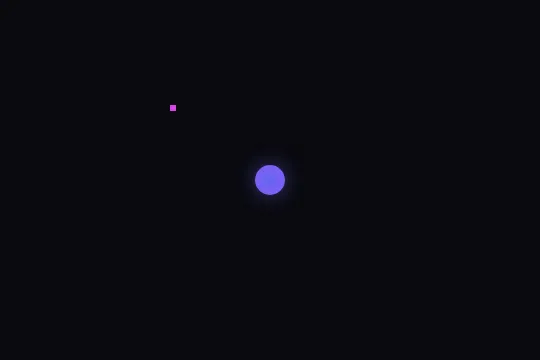
The HTML pre-positions a .particle-burst centred on a .particle-center (radial gradient #6366f1 → #8b5cf6, purple glow) and 30 .particle elements (6 px discs, position:absolute). This is the decorative waiting state: no CSS @keyframes, no RAF — particles don't move on their own. All motion is delegated to the Web Animations API on click.
On click on #explosionBtn, the IIFE computes the button's position relative to #explosionContainer via getBoundingClientRect(). It creates 30 <div class="explosion-particle"> elements positioned at that origin point (position:absolute, left/top in px), coloured by sampling the colors array (to be declared by the integrator), then appended inside #explosionContainer.
Trajectories use uniform angular distribution: 2π / 30 × index, random radius 80 + 80 × Math.random() (between 80 and 160 px). Each particle is animated from translate(0,0) scale(1) to translate(cx,cy) scale(0) with cubic-bezier(0, 0.5, 0.5, 1) easing — organic deceleration simulating ballistic slowdown. Duration varies from 600 to 1000 ms per particle (600 + 400 × Math.random()) to avoid a mechanical feel. The onfinish callback removes each div from the DOM, no memory leaks.
The effect maintains no RAF or global state: each click is independent and simultaneous bursts from multiple buttons are possible. The t && e && guard silently handles missing IDs. For multiple instances on the same page, extract the IIFE logic into a reusable function (see FAQ).
Accessibility
- prefers-reduced-motion: absent from the code — the IIFE does not check
matchMedia('(prefers-reduced-motion: reduce)'). Add manually at the top of the listener:if (window.matchMedia('(prefers-reduced-motion: reduce)').matches) return; - The trigger button (
#explosionBtn) is not provided by the effect — the integrator must add an explicitaria-labeland ensure it is keyboard-focusable. - The 30 dynamically created
.explosion-particledivs carry noaria-hidden="true"by default — add it via JS to prevent noise in the accessibility tree. - The
#explosionContainerhas noroleoraria-live: the explosion is not announced to screen readers — an off-viewportaria-live="polite"region can serve if the burst confirms a business action. - Contrast: the
.particle-center(violet #6366f1) on dark background #0a0a0f exceeds WCAG AA for non-text elements (ratio > 3:1).
Browser compatibility
Relies solely on the Web Animations API (element.animate()) — natively supported since Chrome 36, Firefox 48, Safari 13.1, Edge 79.
If element.animate is unavailable, no explosion occurs but the page stays functional — the t && e && guard silently absorbs missing elements. A Web Animations polyfill (e.g. web-animations-js) is needed for IE11.
The code
HTML structure to paste into your page (the CSS + JS come with Premium):
<div id="explosionContainer" style="position:relative;overflow:hidden">

  <!-- Decorative visual centred (waiting state) -->
  <div class="particle-burst">
    <div class="particle-center"></div>
    <div class="particle"></div>
    <!-- Repeat ×30 .particle -->
  </div>

  <!-- Overlay content + trigger button -->
  <div class="burst-content">
    <button id="explosionBtn" aria-label="Trigger burst">CTA</button>
  </div>

</div>The full HTML + CSS + JS of Particle Burst, ready to paste — plus all 840 effects. Or $299 once, lifetime access.
Customize
Options passed to the API or data-* attributes:
| Option / property | Default | Effect |
|---|---|---|
| colors (global JS variable) | undefined — required | Hex color array for dynamic particles. E.g.: const colors = ['#6366f1','#8b5cf6','#ec4899','#f97316']. Without this declaration the script throws a ReferenceError on the first click. |
| .particle background | #d946ef | Color of the 30 static discs (waiting state). Override via CSS or inline style on each .particle to match the page palette. |
| .particle width / height | 6px / 6px | Size of static discs. Increase to 10–14 px for a denser burst (also affects .explosion-particle if the rule is shared). |
| .particle-center gradient + box-shadow | #6366f1, #8b5cf6 / purple glow | Colors and glow of the central dot. Replace values in the .particle-center rule to align with the brand palette. |
| explosion radius (JS line) | 80 + 80 * Math.random() | Min/max distance in px for particles. Change both constants: e.g. 40 + 40 * Math.random() for a tight burst, 120 + 100 * Math.random() for a wide spread. |
| particle count (JS line) | 30 | Number of .explosion-particle elements per burst. Line: for (let t = 0; t < 30; t++). Reduce to 12–16 for a lighter effect on mobile. |
| animation duration (JS line) | 600 + 400 * Math.random() | Duration range in ms per particle (600–1000 ms). Reduce to 300 + 200 * Math.random() for a snappier burst; increase to 900 + 600 * Math.random() for slow-motion. |
| easing (JS line) | cubic-bezier(0, 0.5, 0.5, 1) | Deceleration curve for particles. Use ease-out for a sharper stop, linear for constant speed until fadeout. |
FAQ
colors array is expected in the global scope but is not included in the effect — by design, so the integrator controls the palette. Add const colors = ['#6366f1','#8b5cf6','#ec4899','#f97316','#22c55e']; in a <script> placed before the effect bundle. In an ES module context, expose it via window.colors = [...] before the import.getElementById. For multiple instances, extract the logic into a function: function initBurst(btnId, cntId, palette) { const b = document.getElementById(btnId), c = document.getElementById(cntId); if (!b || !c) return; b.addEventListener('click', () => { /* ...burst logic with palette... */ }); } and call it for each button/container pair with its own palette.click event fires on tap on iOS and Android Chrome. Position calculation via getBoundingClientRect() is reliable on mobile. The Web Animations API is supported since iOS Safari 13.4 and Android Chrome 36. No touch-specific handling is required.


