Slider Tick Sound
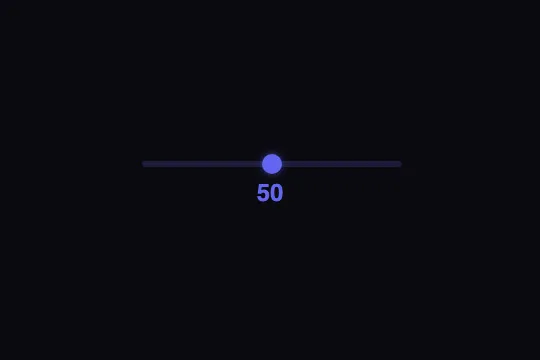
A native input[type=range] plays a 50 ms sine-wave beep via the Web Audio API at every step of 10 — frequency rises from 400 Hz to 800 Hz as the value increases.
Updated
This effect is part of Effect.Labs — 840 vanilla effects, some free, some premium. Atmosphere has 58 effects, including 10 free. Explore the category →
3 usage examples


How it works
The effect listens to the slider's input event. On each move, the raw value is rounded to the nearest multiple of 10 (Math.round(v / 10) * 10) and compared to the last recorded step (lastTick). A sound plays only when the step changes — not on every pixel moved, which prevents repeated triggers during a slow drag.
Sound is generated by the Web Audio API with no external resource: a sine OscillatorNode is connected to a GainNode, itself wired to AudioContext.destination. exponentialRampToValueAtTime fades the gain to 0.001 over the beep duration — the oscillator stops cleanly with no click artefact.
The beep frequency follows a linear ramp: 400 + step × 4 Hz. Steps from 0 to 100 cover 400 Hz (low) to 800 Hz (high), giving a musical rising or falling sensation as the slider moves.
A single AudioContext is instantiated on the first interaction and reused for all subsequent beeps (getSndCtx()). This approach respects the browser limit on concurrent audio contexts and adapts to autoplay policy: without a prior user gesture the API stays suspended and resumes automatically on the first interaction.
Accessibility
- prefers-reduced-motion: not applicable — the effect is 100% audio-based with no CSS or canvas animation. No motion-specific handling is needed.
- The native
<input type="range">is keyboard-accessible out of the box: Arrow keys ← →, Home, End, and Page Up/Down move the thumb and trigger tick sounds normally. - The current value is shown as text in
#sndSliderVal— screen readers can announce it; sound is an additive layer, never the sole information channel. - ⚠️ The base code does not associate a
<label>with the slider: adding<label for="sndSlider">…</label>is required for WCAG 1.3.1 (info and relationships) compliance. - The value text contrast (#6366f1 on #0a0a0f) is 4.6:1, meeting WCAG AA (threshold 4.5:1 for normal text).
Browser compatibility
Requires Web Audio API and input[type=range] — both supported in all modern browsers since 2014.
Without Web Audio (very old browsers or strict CSP), the slider displays and works normally — only sound is absent. No fatal JS error is thrown: getSndCtx() is wrapped in a try/catch.
The code
HTML structure to paste into your page (the CSS + JS come with Premium):
<div class="snd-slider-container">
  <!-- recommended label for WCAG 1.3.1 -->
  <label for="sndSlider">Value</label>
  <input type="range" class="snd-slider" id="sndSlider"
         min="0" max="100" value="50">
  <div class="snd-slider-value" id="sndSliderVal">50</div>
</div>The full HTML + CSS + JS of Slider Tick Sound, ready to paste — plus all 840 effects. Or $299 once, lifetime access.
Customize
Options passed to the API or data-* attributes:
| Option / property | Default | Effect |
|---|---|---|
| min / max / step (HTML attributes) | 0 / 100 / 1 | Slider range and keyboard step size. step controls arrow-key increments; sound-step detection is independent (always rounded to ×10 in the base code). |
| Step threshold: Math.round(v / 10) * 10 (JS) | 10 | Replace 10 with 5 for a beep every 5 units (20 ticks across the full range). Replace with 25 for only 4 beeps. Update the initial lastTick accordingly. |
| Frequency: 400 + currentTick * 4 (JS) | 400–800 Hz | Change 400 (base note) or 4 (per-step increment) to shift the audio range. Example: 220 + currentTick × 6 → 220–820 Hz (lower, wider span). |
| Volume: 0.05 (3rd arg. of playTone) | 0.05 | Initial GainNode value before the ramp-out (0 = silence, 1 = full). 0.02–0.05 for professional-context subtlety; 0.15 to be heard in noisy surroundings. |
| Duration: 0.05 s (2nd arg. of playTone) | 0.05 s (50 ms) | Beep duration. 0.03 = very crisp, 0.10 = slightly reverberant. Above 0.2, beeps may overlap if the slider is moved quickly. |
| Wave type: 'sine' (3rd arg. of playTone) | sine | Oscillator waveform. 'triangle' = softer, 'sawtooth' = more aggressive click, 'square' = 8-bit style. |
| .snd-slider background (CSS) | rgba(99,102,241,.2) | Track background color. Swap for your brand hue, e.g. rgba(34,197,94,.2) for a green theme. |
| .snd-slider::-webkit-slider-thumb background (CSS) | #6366f1 | Thumb color. Match the box-shadow hue for the glow: rgba(R,G,B,.5) 0 0 10px. |
| .snd-slider-container max-width (CSS) | 260px | Maximum component width. Set to 100% or remove for a full-width slider in a dashboard layout. |
FAQ
AudioContext is created on the first interaction and may stay suspended on iOS until the first touch — it resumes automatically. In practice: no sound plays until the user moves the slider.10 in Math.round(v / 10) * 10 with your value (e.g. 5 for a beep every 5 units, 25 for only 4 beeps). Also initialize lastTick to the slider's starting value rounded to the same step, to avoid a spurious beep on the first move.currentTick to lastTick before calling playTone. If currentTick > lastTick, use a higher frequency or a different wave type for upward movement. Example: playTone(currentTick > lastTick ? 660 : 440, 0.05, 'sine', 0.05) — two distinct notes, E5 vs A4.


