WebGPU Spirit Vortex
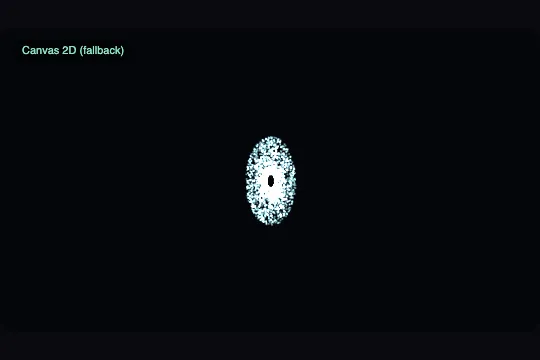
Fourteen thousand spirits drift in an open field and spiral inward around the cursor as if a portal were opening — 2D canvas fallback if WebGPU is absent.
Updated
This effect is part of Effect.Labs — 840 vanilla effects, some free, some premium. Atmosphere has 58 effects, including 10 free. Explore the category →
3 usage examples

How it works
Fourteen thousand seeds are drawn once into a Float32Array: two random numbers per particle, unchanged for the life of the page. Each particle's ambient state is computed every frame from its seed and time: a slow drift angle (a0 + t × (0.08 + r × 0.25)), radius kept at 92 % to avoid overly eccentric orbits. No position array to maintain.
When the cursor is inside the scene, its normalised coordinates (mx, my in clip space, corrected for aspect ratio) are sent to the WGSL shader every frame via the uniform buffer. The shader computes the distance d from the particle's ambient position to the cursor, then an attraction factor k = clamp(0.7 / (d + 0.5), 0, 0.85): zero far away, strong but never total close up. The particle is interpolated between its ambient position and a point on a spiral centred on the cursor — tangential angle atan2 + t × 1.7 − d × 2.6, radius progressively reduced towards a 0.06 core. Colour shifts from teal ((0.32, 0.85, 0.68)) to violet ((0.80, 0.68, 1.0)) with k.
At start-up the code follows exactly the same three-step cascade as WebGPU Particle Field (fx-0802): checking navigator.gpu, obtaining an adapter and device, confirming the webgpu context responds. Any failure, like any exception, switches to the 2D canvas engine, which reproduces the same attraction logic in JavaScript — same render, same interaction, fewer particles.
Accessibility
- Under
prefers-reduced-motion: reduce, time is frozen at zero: particles stay still in their initial arrangement. Cursor interaction remains active (the code does not disable it), but since time does not advance, the spiral no longer rotates — the portal is open but static. - The canvas carries no information: it is decoration. The mode badge
[data-sws-tag]is markedaria-hidden="true". - The 2D canvas fallback is visually complete: a visitor without WebGPU sees the same interactive vortex, with fewer particles. The degradation is in density, never in the presence or interactivity of the effect.
- The
crosshaircursor on the scene signals interactivity without needing extra text or a label. devicePixelRatiois capped at 2 to maintain smoothness on very dense screens.
Browser compatibility
WebGPU (navigator.gpu, WGSL shader, 4 uniform floats) with a full 2D canvas fallback, plus requestAnimationFrame, matchMedia, devicePixelRatio and PointerEvent. No library.
The 2D canvas fallback covers all three WebGPU failure cases: no navigator.gpu, adapter or device refused, failing webgpu context. Without JavaScript, the canvas stays empty: give .sws-scene a background colour. Without PointerEvent, particles drift without interaction (very old browser).
The code
HTML structure to paste into your page (the CSS + JS come with your purchase):
<div class="sws-scene" data-sws>
  <!-- The canvas is sized by the script, never hard-coded -->
  <canvas class="sws-canvas" width="0" height="0"></canvas>

  <!-- Mode badge: the script writes "WebGPU active" or "Canvas 2D (fallback)" here.
       Useful in development; drop it in production if it no longer serves. -->
  <div class="sws-tag" data-sws-tag aria-hidden="true">Canvas 2D (fallback)</div>
</div>One-time payment, no subscription — the code is yours forever
Customize
Options passed to the API or data-* attributes:
| Option / property | Default | Effect |
|---|---|---|
N — particle count |
14000 | On WebGPU, 14,000 is comfortable and 80,000 stays workable on a discrete card. On the 2D canvas fallback, come down to around 4,000: cost there is per particle, not per frame. |
| Portal strength | 0.7 / (d + 0.5), capped at 0.85 |
Raising the numerator (e.g. 1.2) strengthens the pull and broadens the zone of influence. Raising the denominator (e.g. 1.0) gives a gentler portal that only forms when the cursor is very close. |
| Ambient drift speed | 0.08 + radius × 0.25 |
The 0.08 factor is the minimum speed at the centre. The 0.25 factor differentiates centre from rim (slow to fast rotation). Lowering both gives a nearly static field, almost ghost-like. |
| Spiral speed and pitch | angle t × 1.7 − d × 2.6 |
The 1.7 coefficient sets the portal's rotation speed. The 2.6 coefficient controls the arm winding: a higher value makes close particles form a tighter spiral. |
| Convergence radius | mix(d, 0.06, k) |
0.06 is the portal's core radius in clip coordinates. A larger value (e.g. 0.15) gives an open portal with a visible eye; a smaller one (0.02) concentrates nearly all particles into a single point. |
| Palette | teal (0.32, 0.85, 0.68) → violet (0.80, 0.68, 1.0) by k |
The two endpoints control the ambient colour (low k) and the portal colour (high k). For a Halloween mood, replace teal with a soft orange and violet with blood red. |
devicePixelRatio cap |
2 | Sharpness / load trade-off. Do not raise it above 2: the visual gain on fine points is marginal and GPU load grows as the square. |
FAQ
[data-sws] scene found in the document. Each scene has its own seeds, its own canvas and its own cursor tracking: the vortices are independent. On a scrolling page, an IntersectionObserver can be added to pause loops that are off screen.pointermove event also fires on touch on mobile. Dragging a finger across the scene opens the portal, and releasing (pointerleave) sends particles back to ambient drift. The default position [99, 99] (outside normalised clip space) disables attraction between interactions.