Card Flip 3D
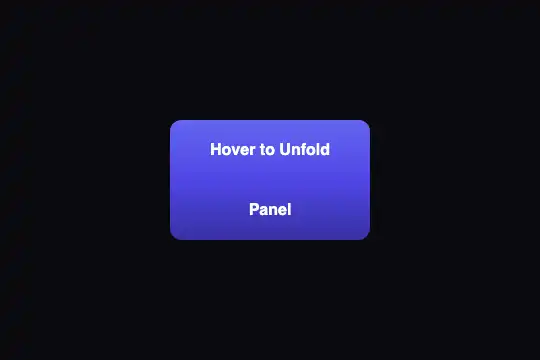
A 200 × 140 px card makes a half turn around its vertical axis in 0.8 s, overshoots the half turn slightly, then settles: indigo-violet front, magenta-pink back, back faces hidden. Hover, the Tab key or a tap flips it; zero JavaScript, and no rotation at all (the back fades in) when the user reduces motion.
Updated

This effect is part of Effect.Labs — 840 vanilla effects, some free, some premium. 3D has 50 effects, including 8 free. Explore the category →
3 usage examples



How it works
The root .fx-0002-root (#0a0a0f background, at least 300 px tall) centers a 200 × 140 px .flip3d-container frame that carries perspective: 1000px and tabindex="0". Inside it, .flip3d-card fills the frame with transform-style: preserve-3d: its two faces stay in the same 3D space instead of being flattened onto it. The faces .flip3d-front (#6366f1 → #8b5cf6 gradient) and .flip3d-back (#d946ef → #f43f5e gradient) are stacked with position: absolute; the back is turned 180° in advance (rotateY(180deg)) and each face has backface-visibility: hidden, which makes it invisible while it faces away from the screen.
When the frame is hovered, or when it has focus (:focus-within), the card gets rotateY(180deg): the front turns away and disappears, the back comes into view. The transition lasts 0.8 s on the curve cubic-bezier(.175, .885, .32, 1.275), whose output goes above 1: the card passes edge-on at 90° after 0.09 s (94 ms measured in Chromium 151), swings to about 196° around 0.5 s, then settles back at 180°. That small rebound is what gives the card its weight. When the pointer leaves or focus moves away, the same curve brings it back, with the same overshoot on the other side.
Why the hover sits on the frame and not on the card: the mouse hits a transformed element according to its transformed shape. At 90°, the card is just a line; if it carried the :hover itself, the pointer would leave it mid-turn and it would swing back, over and over. The frame does not move: its 200 × 140 px area stays stable during the whole motion. It also carries the perspective, because perspective applies to the children of the element that declares it.
Accessibility
- Keyboard and touch: the frame has
tabindex="0"and every:hoverrule is doubled by:focus-within. Tab gives the card focus and flips it, a second Tab moves to the next element and flips it back; a 2 px#a5b4fcring (:focus-visible) marks keyboard focus only. On a touchscreen, a tap gives focus and flips the card, a tap elsewhere flips it back. Measured in Chromium 151, Firefox 153 and WebKit 26 (Tab and emulated touch). A mouse click also gives focus: the card stays flipped after the pointer leaves, until the next click elsewhere. - Reduced motion: under
prefers-reduced-motion: reduce, a block scoped to.fx-0002-rootremoves the rotation (computed transform:none) and lays the back flat over the front, invisible; hover, focus or a tap fade it in over 0.3 s. Both faces stay readable without any motion in space. - Screen readers:
backface-visibilityonly hides on screen. Both faces are in the HTML and are read in order, front then back, whether the card is flipped or not. If the back is an answer to guess (quiz, word to translate), say so in the front text rather than relying on the flip. - Contrast: the 18 px bold white text measures 4.47:1 to 4.23:1 on the front and 3.46:1 to 3.67:1 on the back. 18 px stays under the "large text" threshold (18.66 px bold), which requires 4.5:1: darken the gradients (for instance
#4f46e5, 6.29:1) or raise the text to 19 px if the card carries information.
Browser compatibility
CSS only (perspective, transform-style: preserve-3d, backface-visibility, :focus-within, :focus-visible), no JavaScript, no dependencies. Measured in Chromium 151 and Firefox 153: same flip, same rebound, two independent copies on one page, back fading in without rotation under reduced motion. Playwright's WebKit (26.5) flattens all CSS 3D, even a reference cube: focus and touch are measured there, the 3D rendering was not checked on a real Safari. Unprefixed backface-visibility exists in Safari since version 15.4.
Without 3D transforms, the card does not turn and the back stays hidden behind the front. In Safari before 15.4, add -webkit-backface-visibility: hidden to both faces, otherwise the front shows mirrored through the back. Without :focus-visible (older browsers), the browser's default focus outline shows instead.
The code
HTML structure to paste into your page (the CSS + JS come with your purchase):
<div class="fx-0002-root">
  <div class="demo-3d">
    <div class="flip3d-container" tabindex="0">
      <div class="flip3d-card">
        <div class="flip3d-face flip3d-front">… recto …</div>
        <div class="flip3d-face flip3d-back">… verso …</div>
      </div>
    </div>
  </div>
</div>One-time payment, no subscription — the code is yours forever
Customize
Options passed to the API or data-* attributes:
| Option / property | Default | Effect |
|---|---|---|
Size (CSS — width and height of .flip3d-container) |
200 × 140 px | The card and its faces follow the frame (100%). For a large card, raise the perspective in the same proportion: at 360 px wide, 1,000 px of perspective still looks natural; below 600 px the edge turning toward you grows a lot. |
Perspective (CSS — perspective of .flip3d-container) |
1000px | The smaller the value, the stronger the depth during the half turn: 600px exaggerates it, 2000px gives an almost flat flip. |
Duration and rebound (CSS — transition of .flip3d-card) |
.8s cubic-bezier(.175, .885, .32, 1.275) | The second value above 1 (1.275) creates the overshoot of about 16°. ease-in-out removes the rebound; .5s gives a snappier flip. |
Axis (CSS — rotateY in the hover rule and in .flip3d-back) |
rotateY(180deg) | Replace both with rotateX(180deg) for a card that tips from top to bottom. Always change both together, or the back shows upside down. |
Hover delay (CSS — transition-delay on the :hover rule) |
none | .3s keeps a card from flipping when the mouse only crosses it, useful in a grid of cards. Put it on the way in only: leaving stays immediate. |
Colors and focus ring (CSS — .flip3d-front, .flip3d-back, :focus-visible) |
#6366f1 → #8b5cf6, #d946ef → #f43f5e, ring #a5b4fc | The gradients can be changed freely. The light ring is made for the root's dark background: on a white page, pick a dark color (for instance #4f46e5). |
FAQ
tabindex="0"), and :focus-within keeps the card flipped as long as focus stays inside: that is what makes it usable with a keyboard and a finger. It flips back as soon as you click or tap elsewhere. If you only want hover, remove tabindex and the :focus-within rules; the card will then no longer be reachable with the keyboard.:hover and :focus-within with a class, for instance .flip3d-container.is-flipped .flip3d-card { transform: rotateY(180deg) }, turn the frame into a <button> and toggle the class on click with one line of JavaScript (classList.toggle), updating aria-pressed. A <button> answers Enter and Space natively.