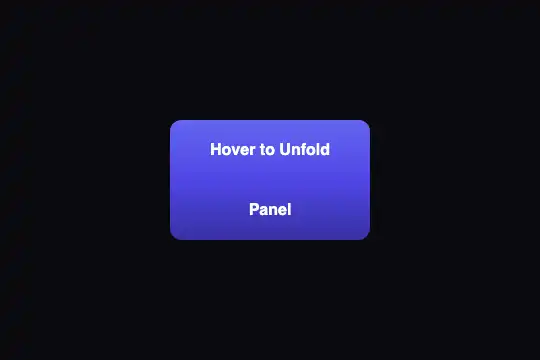
Perspective Tilt
A 200 × 140 px indigo card tilts toward the pointer, up to 12° at its edges, a spot of light slides exactly under the mouse and the text floats 40 px in front: it answers a finger and the arrow keys too, every copy on the page gets its own card, and when the system asks for less animation it stops leaning but keeps its glint.
Updated

This effect is part of Effect.Labs — 840 vanilla effects, some free, some premium. 3D has 50 effects, including 8 free. Explore the category →
3 usage examples



How it works
On the bluish black of .fx-0003-root (300 px tall or more), a 280 × 200 px .demo-3d frame carries the card .perspective-tilt: 200 × 140 px, #1e1b4b → #312e81 gradient, translucent indigo border, 1rem corners. Each root gets its own instance of the script, which only looks after its own card. As the pointer glides over the card, its position is mapped from 0 to 1 across and down, and the script writes transform: perspective(1000px) rotateX(…) rotateY(…): the side under the pointer comes toward you, the opposite side sinks back, up to 12° at the edges. Read near the top left corner (5% in): 11.0° and 10.6°, the same in Chromium 151 and Firefox 153. A 0.1 s transition irons out the jolts; when the pointer leaves, the card returns flat.
The light is a ::before pseudo-element covering the whole card: an indigo radial gradient (rgba(99, 102, 241, .3), transparent at 50%) centered on two CSS variables, --mouse-x and --mouse-y, that the script updates as percentages. The spot therefore follows the pointer to the pixel, whatever the card size, and stays at the last point touched when the card flattens. The text .perspective-tilt-content is pushed 40 px forward (translateZ) inside a card set to transform-style: preserve-3d: it keeps that depth when the card tilts and slides against the background, by 9.6 px with the pointer at the right edge (measured in Chromium and Firefox).
Three choices make the card usable everywhere. pointer events drive the card, so a pen or a finger makes it lean just like the mouse, and touch-action: none keeps the page from scrolling while the finger slides over the card; it returns flat when the finger lifts. Thanks to tabindex="0" the card takes focus, and a role="group" with an aria-label names it. From the keyboard, each arrow walks the glint a tenth of the card; Escape or leaving the card straightens it. Finally the angle is computed as a fraction of the card, not in pixels: enlarged to 400 × 200 px as in the scenes, it still never goes past 12°, whereas a pixel-based formula would double the angle each time the width doubles.
Accessibility
- Reduced motion: with
prefers-reduced-motion: reduce, the@mediarule written under.fx-0003-rootpins the card flat (transform: none, no transition). The spot of light still follows the pointer, so the hint of where you point is kept without any movement in space. Checked in all three engines (Chromium, Firefox, WebKit): 0° under the mouse, against 11° without the setting. - Keyboard: the card is a tab stop; on focus a 2 px lavender
#a5b4fcline surrounds it (:focus-visible, 9.9:1 against the background). Pressing → four times then ↑ twice leans it by 9.6° and 4.9°; Escape or moving focus away straightens it. - Screen readers: the card is announced by its name,
aria-label="Tilt card: the arrow keys tilt it"set on arole="group", then "Move Mouse" is read. On a site in another language, write that name in it. If the card leads somewhere, put a real link in its content. - Contrast: white text on
#312e81at 11.4:1 and on#1e1b4bat 16:1. The indigo spot only lightens it slightly: keep light text if you recolor the card in a dark tone. - Touch:
touch-action: noneblocks page scrolling when the finger starts on the card. At 200 × 140 px that is no trouble; for a card spanning the full width of a phone, switch totouch-action: pan-y: vertical scrolling comes back, and only a sideways drag tilts the card.
Browser compatibility
CSS (transform with perspective(), rotateX and rotateY, transform-style: preserve-3d for the text depth, CSS variables inside a gradient, touch-action, :focus-visible) + JS with pointer events, no dependencies. Measured in Chromium 151 and Firefox 153: same tilt, same spot of light, two independent copies on one page, flat card under reduced motion, finger tilt (Chromium in touch mode). Playwright's WebKit (26.5) does show the card tilting, but it flattens all nested 3D, even on a reference cube: the text depth was not checked on a real Safari.
Without 3D transforms, the card stays flat and only the spot of light follows the pointer. Without :focus-visible (older browser), the browser's default focus ring shows instead.
The code
HTML structure to paste into your page (the CSS + JS come with your purchase):
<div class="fx-0003-root">
  <div class="demo-3d">
    <div class="perspective-tilt" tabindex="0" role="group" aria-label="…">
      <span class="perspective-tilt-content">Move Mouse</span>
    </div>
  </div>
</div>One-time payment, no subscription — the code is yours forever
Customize
Options passed to the API or data-* attributes:
| Option / property | Default | Effect |
|---|---|---|
Maximum tilt (JS — MAX_TILT = 12) |
12° | Angle reached at the edges of the card, whatever its size. 6 gives a subtle effect for a button or a product visual; past 20, the text becomes hard to read while moving. |
Perspective (JS — perspective(1000px) in the transform) |
1000px | The smaller the value, the stronger the distortion at the same angle: 500px makes the near side clearly larger than the far side. Change it in both places in the script (tilt and reset). |
Text depth (CSS — translateZ(40px) on .perspective-tilt-content) |
40 px | Distance of the text in front of the card: 9.6 px of slide measured at the edge with 40 px. At 0 the text sticks to the card; past 60 it seems to come loose. |
Light (CSS — radial-gradient of ::before) |
rgba(99, 102, 241, .3), transparent 50% | Color and size of the spot. White at .5 gives the glint of a glossy material (enamel, card, metal); lower the second percentage (30%) for a smaller, sharper spot. |
Card size (CSS — .perspective-tilt, .demo-3d) |
200 × 140 px in a 280 × 200 px frame | The angle does not depend on the size. Enlarge .demo-3d as well, or remove its dimensions, or the card overflows the frame. |
Responsiveness (CSS — transition: transform .1s ease-out) |
0.1 s | 0.3 s gives a heavier card that catches up with the pointer after a delay; 0 glues it to the pointer with no smoothing at all. |
Keyboard step (JS — 0.1 in the keydown listener) |
10% of the card per press | 0.25 reaches the edge in two presses; keep a value that lets each press show a visible movement. |
FAQ
card.style.setProperty('--mouse-x', '50%') and the same line for --mouse-y to the script's reset() function..fx-0003-root, and the script launches one per root, without any id. Tried with two copies on the same page, in all three engines: only the hovered card moves. For a row of cards, give each card its own root and paste the script once.