3D Room
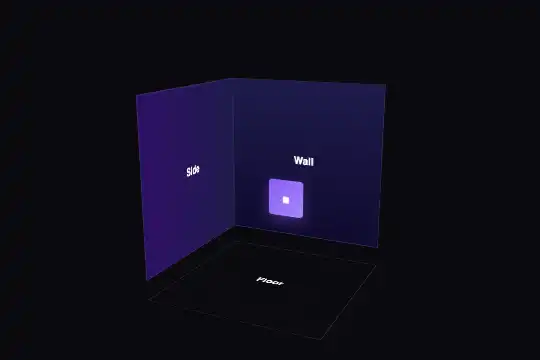
A room corner in CSS 3D — grid floor, back wall, left wall and a small purple cube — seen from above, that you turn by dragging it with a mouse or a finger (up to 45° vertically, freely sideways) or with the arrow keys, and that eases back to its starting view when you let go.
Updated
This effect is part of Effect.Labs — 840 vanilla effects, some free, some premium. 3D has 50 effects, including 8 free. Explore the category →
3 usage examples

How it works
The root .fx-0028-root (#0a0a0f background, at least 300 px tall) centers a 220 × 220 px .room-wrapper frame that carries the perspective (600 px). Inside it, .room keeps its children in 3D (transform-style: preserve-3d) and starts at rotateX(-15deg) rotateY(-25deg). Three 180 × 180 px faces make the corner: the floor, with a grid every 30 px, laid down by rotateX(90deg) translateZ(-90px); the back wall, pushed back 90 px; the left wall, turned 90° then pushed back 90 px. The small 40 px cube is a purple square brought forward to translateZ(-40px), in front of the back wall. There are only two walls so the inside is always visible: a third one would hide the room from some angles.
The script starts one instance per .room-wrapper found under a .fx-0028-root root. On pointerdown (mouse, finger or pen), it captures the pointer: the following moves keep reaching it even if the finger leaves the frame. Each pixel dragged horizontally turns the room 0.5° around the vertical axis, without limit; each vertical pixel tilts it 0.3°, clamped between −45° (seen from above) and +5°. On release, the room goes back to its starting view in 0.6 s. Measured in Chromium 151, Firefox 153 and WebKit 26: a drag of 120 px to the right and 40 px down gives rotateX(-27deg) rotateY(35deg), then the return to −15° / −25°; same result on the second copy of the effect, independent of the first.
The frame has touch-action: none: a finger on the room turns it instead of scrolling the page (measured with real touch events in Chromium: 120 px right and 24 px down give −22.2° / +35°). The frame is only 220 px wide: the rest of the page scrolls normally. With the keyboard, the frame takes focus (tabindex="0"); the left and right arrows turn the room by 10°, up and down tilt it by 10° (same limits), Escape or Home brings back the starting view, and the room also returns there when focus leaves. Measured in all three engines: → twice then ↑ gives −25° / −5°.
Accessibility
- Keyboard: the frame is focusable, announced by its
aria-labelas a 3D room to turn by dragging or with the arrows, and gets a 2 px purple outline on focus. Arrows = 10° per press, Escape or Home = starting view. Tab reaches the frame in Chromium, Firefox and WebKit (measured). - Reduced motion: under
prefers-reduced-motion: reduce, the room still follows the gesture (the user is the one turning it) but no longer glides on its own: a block scoped to.fx-0028-rootremoves the transition, and the script, which reads the same preference, snaps back to the starting view instead of a 0.6 s animation. Nothing ever turns by itself. - Content: the face labels ("Floor", "Wall", "Side") are real text, read by screen readers, but the 3D view itself is only described by the


aria-label: if the room's layout carries information (area, height, furniture), write it next to it as well, as the scenes above do. - Touch:
touch-action: nonekeeps the page from scrolling when the finger starts on the room. Keep the frame a reasonable size on mobile to leave room for scrolling.
Browser compatibility
CSS 3D (perspective, transform-style: preserve-3d, rotateX/Y, translateZ) + 35 lines of JavaScript (pointer events with capture, keyboard, matchMedia), no dependencies. Measured in Chromium 151 and Firefox 153: same 3D rendering, same angles when dragging and with the keyboard, return to the starting view, two independent copies; touch measured in Chromium. In WebKit 26, the computed angles are identical, but Playwright's WebKit flattens all CSS 3D (even a reference cube): rendering in Safari has not been verified on a real Safari.
Without JavaScript, the room stays frozen in its starting view, still readable. If a rule on your page adds overflow, filter or an opacity below 1 to .room, the 3D is flattened: the three faces stack up flat (that is what transform-style: preserve-3d does when one of these properties is forced on it).
The code
HTML structure to paste into your page (the CSS + JS come with your purchase):
<div class="fx-0028-root">
  <div class="room-wrapper" data-room="" tabindex="0" role="group" aria-label="3D room: drag, or use the arrow keys, to turn it">
    <div class="room">
      <div class="room-face room-floor">Floor</div>
      <div class="room-face room-back">Wall</div>
      <div class="room-face room-left">Side</div>
      <div class="room-object">■</div>
    </div>
  </div>
</div>One-time payment, no subscription — the code is yours forever
Customize
Options passed to the API or data-* attributes:
| Option / property | Default | Effect |
|---|---|---|
Starting view (JS — X0 = -15, Y0 = -25; CSS — transform on .room) |
−15° vertically, −25° sideways | Change both places together. −30° / −40° shows more of the floor (useful for a layout plan); −5° / −15° gives an almost head-on view of the back wall. |
Sensitivity (JS — .5 and .3 in pointermove) |
0.5° per pixel horizontally, 0.3° vertically | 1° per pixel turns the room a full circle in 360 px of dragging; 0.3° calms it down, for a narrow frame on mobile. |
Tilt limits (JS — Math.max(-45, Math.min(5, x))) |
−45° to +5° | Beyond −60°, the room is seen almost from above and the walls flatten; beyond +10°, you go under the floor, whose underside is not designed. |
Return on release (JS — turn(X0, Y0, .6)) |
0.6 s, always returns | Lengthen it to 1 s for a softer return. To keep the room where it was left, remove the turn(X0, Y0, .6) call in release() and keep Escape to come back. |
Room size (CSS — .room-wrapper 220 px, 180 px faces, translateZ(-90px)) |
220 px frame, 180 px faces | Keep translateZ equal to half the face size: for 260 px faces, push back 130 px. Or enlarge everything at once with transform: scale() on the frame, as the scenes do. |
Faces and object (CSS — .room-floor, .room-back, .room-left, .room-object) |
30 px grid floor, indigo walls, 40 px purple cube | Recolor them, change the grid, write a measurement on a face; the object can carry a word if you widen it (76 × 34 px in the scenes). Its depth is set with translateZ. |
FAQ
turn(X0, Y0, .6) call from the release() function.touch-action: none: a gesture that starts on the room does not scroll the page. It is only 220 px wide, so the rest of the page scrolls normally; do not stretch it over the full height of a phone screen.

