Isometric Grid
Nine indigo blocks in a 3 × 3 grid seen in isometric view (tilted 60°, turned −45°), each closed by a 20 px front face and left face; the block that is hovered, tapped or reached with the keyboard rises 30 px and turns pink-violet, like a drawer pulled out — one cell at a time, in pure CSS, no JavaScript.
Updated
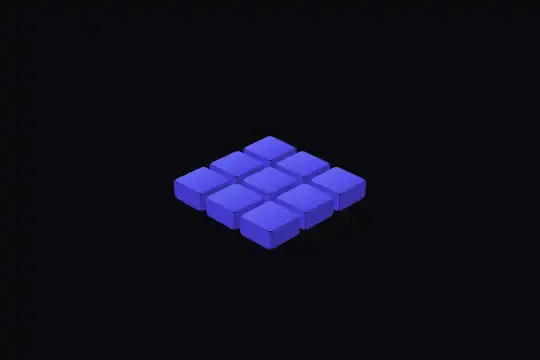
This effect is part of Effect.Labs — 840 vanilla effects, some free, some premium. 3D has 50 effects, including 8 free. Explore the category →
3 usage examples



How it works
The root .fx-0010-root (#0a0a0f background, at least 300 px tall) centers .isometric-container, which carries perspective: 1000px, then .isometric-grid: a CSS grid of 3 columns of 40 px, 8 px gap, turned by transform: rotateX(60deg) rotateZ(-45deg) and set to transform-style: preserve-3d so its children keep their own depth. The nine .isometric-cell elements (40 × 40 px, #6366f1 → #4f46e5 gradient, 4 px corners, tabindex="0") are preserve-3d too: their pseudo-elements become faces.
Each block has two faces, the ones you see at this angle. ::before is the front face: hung under the cell's bottom edge (top: 100%, 20 px tall, #3730a3), it pivots around that edge (transform-origin at the top, rotateX(-90deg)) and drops toward the ground. ::after is the left face: hung on the left edge (right: 100%, 20 px wide, #4338ca), it pivots around that edge (rotateY(-90deg)). The back and right faces would be hidden: they are not drawn. On hover (or :focus-visible), the cell takes translateZ(30px) and a #d946ef → #a855f7 gradient, its faces switch to #7c3aed and #8b5cf6, in 0.3 s. With 20 px faces, the raised block floats 10 px above the ground and reveals the dark hole of its slot: a drawer pulled out. Measured: 1.6% of pixels change when hovering the center cell, identically in Chromium 151 and Firefox 153 (0.2% apart).
Only the cells catch the pointer: pointer-events: none on the grid, auto on the cells. Measured in Chromium with touch emulation: without that rule, the touch goes to the tilted grid and no cell rises; with it, the touched cell rises. It is also why a pointer resting in a gap between two cells lifts nothing. A single :hover rule drives everything: there is only ever one raised cell, the one under the pointer or the one with focus.
Accessibility
- Reduced motion: under
prefers-reduced-motion: reduce, a block scoped to.fx-0010-rootcancels the lift: the hovered or focused cell turns pink-violet in place. Measured in Chromium and Firefox: transform unchanged, 0.7% of pixels change on hover (1.6% without the preference). - Keyboard: the nine cells have
tabindex="0"; Tab walks them in grid order, and focus gives the hover state plus a 2 px#f0abfcoutline (11.2:1 on the background). The demo cells are emptydivelements: when they stand for something (a room, a locker), name them witharia-labeland, if they trigger an action, addrole="button"and the Enter key in your script. - Contrast: the blocks' indigo measures 4.4:1 on the
#0a0a0fbackground, the pink-violet 5.7:1; but between the two the gap is only 1.3:1. The lift (and the outline from the keyboard) marks the cell, not the color alone: under reduced motion, if the choice matters, add a text or a border. - Touch: with a finger, the tapped cell rises (measured with Chromium touch emulation and in Firefox) and stays raised until the next tap.
Browser compatibility
3D CSS on three levels (perspective on the container, preserve-3d on the grid then on each cell, faces as pseudo-elements), :focus-visible, no dependencies, no JavaScript. Measured in Chromium 151 and Firefox 153: same render at rest and on hover (0.2% apart), same reduced motion, 0 errors. Playwright's WebKit flattens all preserve-3d 3D, even a reference cube: its captures say nothing about Safari. Safari rendering not checked on a real Safari.
If the browser flattens the 3D, the faces fold into the grid's plane: you see flat cells, and the lift barely shows; the color change on hover remains. Without :focus-visible, keyboard focus only gets the browser's ring.
The code
HTML structure to paste into your page (the CSS + JS come with your purchase):
<div class="fx-0010-root">
  <div class="demo-3d">
    <div class="isometric-container">   <!-- perspective: 1000px -->
      <div class="isometric-grid">   <!-- rotateX(60deg) rotateZ(-45deg), preserve-3d -->
        <div class="isometric-cell" tabindex="0"></div>   <!-- ::before front face, ::after left face -->
        … (9 cells)
      </div>
    </div>
  </div>
</div>One-time payment, no subscription — the code is yours forever
Customize
Options passed to the API or data-* attributes:
| Option / property | Default | Effect |
|---|---|---|
Cell size and count (CSS — grid-template-columns and .isometric-cell size) |
repeat(3, 40px); 40 × 40 px; 9 cells | Change both together, and add as many div elements as cells: repeat(4, 40px) with sixteen cells gives a 4 × 4 board. |
Gap (CSS — grid gap) |
8 px | Under 4 px, the blocks touch and the grid looks like a solid slab; above 12 px, they become separate islands. |
Block height (CSS — height of ::before and width of ::after) |
20 px | Change both values together. At 30 px, equal to the lift, the raised block stays on the ground instead of floating. |
Lift (CSS — hover translateZ) |
30 px | 50 px pulls the block out clearly; higher up, it covers part of the cell behind it. |
| Colors (CSS — cell gradient and both faces' background, at rest and on hover) | #6366f1 → #4f46e5, faces #3730a3 / #4338ca; hover #d946ef → #a855f7, faces #7c3aed / #8b5cf6 | Keep the front face darker than the left face, and both darker than the top: that is what gives light from above. |
View angle (CSS — rotateX(60deg) rotateZ(-45deg)) |
60° and −45° | Between rotateX(55deg) and 65deg, the view stays close to isometric. Switching to rotateZ(45deg) shows the front and right faces instead: move ::after to the right edge (left: 100%, pivot on the left, rotateY(90deg)). |
FAQ
.is-selected) that reuses the hover values — transform: translateZ(30px), the pink-violet gradient and both faces' colors — and set it on the chosen cell. The locker scene does exactly that for the assigned locker. Give that cell a readable name (aria-label, aria-current).

