Layered Paper
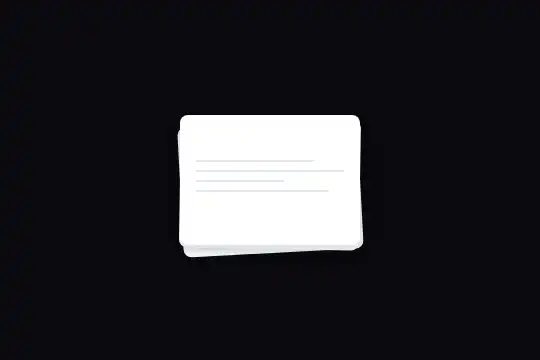
A stack of three white lined sheets (180 × 130 px), slightly askew (−3°, 1°, 0°) with soft shadows: on hover, the two underneath fan out to the left and right, the top one lifts by 10 px and its shadow deepens. No 3D, no JavaScript: flat rotations, offsets and shadows, over 0.5 s. Hover, Tab or a tap; under reduced motion, the sheets take their place without sliding.
Updated
This effect is part of Effect.Labs — 840 vanilla effects, some free, some premium. 3D has 50 effects, including 8 free. Explore the category →
3 usage examples
How it works
The root .fx-0025-root (#0a0a0f background, at least 300 px tall) centers .paper-stack, a 180 × 130 px area with tabindex="0". The three .paper-sheet elements fill it with position: absolute and 8 px corners, each holding a few 2 px .paper-line elements (#e2e8f0, 60 to 100% wide) that draw writing lines. At rest, the bottom sheet (.paper-1, #f8fafc) is turned −3° and lowered 8 px, the middle one (.paper-2, #f1f5f9) 1° and 4 px, the top one (.paper-3, white) stays straight; z-index 1, 2, 3 stacks them in that order, and wider and wider shadows set them apart.
When the stack is hovered, or has focus (:focus-within), each sheet moves to a new position over 0.5 s (cubic-bezier(.25, .46, .45, .94), a quick start that slows down): the bottom one goes to −8°, moves 20 px to the left and down to 16 px; the middle one goes to 5°, moves 15 px to the right and down to 10 px; the top one rises 10 px. The shadows grow at the same time (up to 0 15px 40px for the top sheet), which is what reads as lifting. Because rotate() is written before translate(), each sheet moves along its own tilted axis: the fan opens along an arc, not a straight line.
Why no 3D: everything relies on in-plane rotations and shadows, properties every browser draws the same way. Measured in Chromium 151, Firefox 153 and WebKit 26: same final positions (identical matrices) and the same share of the image changing on hover (5.45%, 5.38% and 5.47%). It is the safest "paper" effect in the category, Safari included.
Accessibility
- Keyboard and touch: the stack has
tabindex="0"and every:hoverrule is doubled by:focus-within. Tab fans the sheets out, the next Tab gathers them; a 2 px#a5b4fcring (:focus-visible, offset 10 px to surround the fan) marks keyboard focus. On a touchscreen, a tap fans the stack out, a tap elsewhere closes it. Measured in Chromium 151, Firefox 153 and WebKit 26. The stack hascursor: pointerand a click gives it focus: it stays fanned out until the next click elsewhere. - Reduced motion: under
prefers-reduced-motion: reduce, a block scoped to.fx-0025-rootlimits the transition to the shadows. The sheets take their fanned position at once, without sliding or turning (positions reached by the first measured frame, at 100 ms), and only the shadows fade over 0.3 s. - Decorative content: the lines are empty



divelements, with no text; screen readers read nothing. If the sheets stand for documents (quotes, letters, cards), write their title as real text on each sheet, in the order they should be read. - Contrast: the
#e2e8f0lines on white (1.23:1) are decoration, not text. To write on the sheets, reuse the text color already declared on the top sheet,#1e293b(14.63:1 on white).
Browser compatibility
CSS only (2D transform, box-shadow, transitions, :focus-within, :focus-visible), no JavaScript, no dependencies, no 3D. Measured in Chromium 151, Firefox 153 and WebKit 26: same fanned positions, same shadows, two independent copies on one page, sheets set down without sliding under reduced motion, keyboard and touch focus.
Without transitions, the stack jumps straight from tidy to fanned. Without :focus-visible (older browsers), the browser's default focus outline shows instead; without :focus-within, only the mouse fans the stack out.
The code
HTML structure to paste into your page (the CSS + JS come with your purchase):
<div class="fx-0025-root">
  <div class="paper-stack" tabindex="0">
    <div class="paper-sheet paper-1">
      <div class="paper-lines">
        <div class="paper-line"></div> … (3 lines)
      </div>
    </div>
    <div class="paper-sheet paper-2">…</div>
    <div class="paper-sheet paper-3">… (top sheet, 4 lines)</div>
  </div>
</div>One-time payment, no subscription — the code is yours forever
Customize
Options passed to the API or data-* attributes:
| Option / property | Default | Effect |
|---|---|---|
Fan spread (CSS — translateX in the hover rules of .paper-1 and .paper-2) |
−20 px and 15 px | This is what sticks out of the lower sheets. To write a readable title there, go up to ±50 or ±60 px (scenes above); at 0, the stack only lifts. |
Rotations (CSS — rotate() at rest and on hover) |
−3°, 1°, 0° at rest; −8°, 5°, 0° fanned | Stay under 10°: beyond that, the corners clearly stick out of the stack and the effect loses its paper-on-a-desk feel. 0° everywhere gives a perfectly aligned stack that only slides. |
Lift (CSS — translateY(-10px) and box-shadow of .paper-3 on hover) |
−10 px, shadow 0 15px 40px at 15% | The shadow does half of the lifting: a wider, softer shadow (0 24px 50px) makes the sheet clearly take off, without changing the offset. |
Size (CSS — width and height of .paper-stack) |
180 × 130 px | The sheets follow the stack (inset: 0). For a landscape letter format, keep a ratio close to 1.4 (for instance 280 × 200 px) and widen the spread in the same proportion. |
Duration and curve (CSS — transition of .paper-sheet) |
.5s cubic-bezier(.25, .46, .45, .94) | The transition covers every property (position and shadow together). .35s gives a brisk gesture; a slight overshoot (cubic-bezier(.34, 1.4, .64, 1)) makes the sheets bounce. |
Paper and lines (CSS — background of the three sheets, .paper-line) |
#f8fafc, #f1f5f9, #fff; lines #e2e8f0 | Keep the lower sheets slightly darker than the top one: that is what reads as depth. On a light background, darken the shadows rather than the paper. |
FAQ
perspective or preserve-3d, nothing can be flattened by a parent with overflow: hidden or opacity, and the effect drops into any layout without precautions..paper-sheet block at the start of the stack, with a paper-0 class and z-index: 0: it goes under the other three. Give it a resting position (for instance rotate(2deg) translateY(10px)) and a fanned position reaching a bit further than the others (rotate(9deg) translate(30px, 18px)), with a slightly shorter shadow: it is the farthest from the eye..paper-lines with text. The top sheet reads in full; the lower ones only show their edge when the stack spreads (20 and 15 px by default). Write their title against that edge (left for .paper-1, right for .paper-2) and widen the spread, as in the quotes scene where the name and amount stick out by 64 px.

